Management and Editing of Embroidery
Editing allows an embroidery preview, knowing the stitches, number of colors and dimensions, optimizing the industrial workflow without the need for constant external terminals.
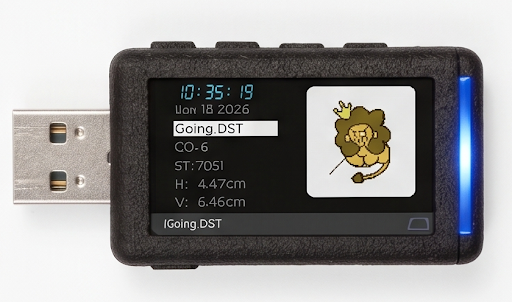
Interface Specifications
0.01mm precision control over every stitch and design dimension directly on the GS4 OLED panel.
H/V Dimensions
Immediate visualization of the .DST file's vertical and horizontal scale to ensure perfect fit in the hoop.
Stitch Count (ST)
Total amount of embroidery stitches processed in real time.
ST:7051
Number of Colors (CO)
Visualization of the total number of threads and color changes programmed in the design to optimize preparation.
Design Preview
Vector rendering optimized for the OLED screen. Visually identify your files (like the lion design) without opening PC software.
- check_circle Anti-Aliasing Rendering
- check_circle Multi-Layer Support

LION_V1.DST
Workflow Integration
Eliminate bottlenecks between the design department and the production floor. The GS4 acts as the ultimate digital bridge.
Immediate Upload
Ultra-fast USB 3.2 transfer of entire design libraries.
Field Verification
Parameter confirmation (ST, CO, Dimensions) at the machine.
Safe Execution
Error prevention by blocking corrupted files or out-of-range dimensions.
Industrial Ecosystem
Direct connection to Tajima, Barudan and SWF machines.